


BCBSTX
4.61.94K Reviews
App Specs
- Version
- 7.29.0
- Updated On
- License
- Free
- Downloads
- 1,000,000+
- Developer
- Blue Cross and Blue Shield of Texas
- Categories
- Medical
- Platform
- Android, iOS
Screenshots
 Analysis by AppCompare
I find a health-plan app most useful when it helps me answer one practical question quickly: what information do I need before I make a call, book care, or show up for an appointment? That is the lens I’d use for BCBSTX. It is a free medical app from Blue Cross and Blue Shield of Texas, built around member information rather than general medical advice. If your coverage is with BCBSTX, that focus can make it a handy place to start; if you are looking for a tool to manage care across unrelated insurers, it is not the right fit.
Keeping plan details close at hand
The most useful way to think about this app is as a mobile companion to your insurance membership. Instead of treating it like a full medical-record system, I’d use it to check plan-related details and keep membership information accessible while handling ordinary healthcare tasks. That distinction matters: insurance information can help you prepare for care, but it is not a substitute for a clinician, a pharmacy’s own system, or a provider’s appointment portal.
BCBSTX has been around since December 17, 2010, and its current release is version 7.13.0. It has a 4.5 average from around 6,100 ratings, with about 1.8 thousand written reviews, and has passed one million installs. Those figures suggest that many members have found a reason to keep it available, though ratings alone cannot tell you whether its tools match your specific plan. I’d treat it as a practical member utility, not as proof that every feature applies to every account.
What a member app is good at
When I’m deciding whether to use an insurer’s app, I want to know whether it can reduce the small bits of friction around care: checking information before a visit, keeping a membership card close, or reviewing plan matters without searching through paper documents. That is the kind of job a dedicated insurer app is designed to handle. Its value is less about replacing every health service on my phone and more about making the insurance side of a visit easier to reach.
A useful habit is to check the app before you need it urgently. Sign in at a calm moment, find where the information relevant to your membership sits, and make sure you know how to get back to it. Then, if a clinic asks for insurance details while you are at the front desk, you are not trying to learn the layout with a queue behind you. I would also keep any information your provider specifically asks you to bring, since an app should be treated as convenient access, not as a guarantee that every office can retrieve what it needs from your phone.
How I would use it during a normal care errand
Picture a routine appointment that has been on the calendar for weeks. Before leaving home, I’d open the app to review the member information I may need, then keep my phone accessible for check-in. If a question about coverage comes up, I’d use the insurer’s member tools as a starting point rather than guessing from memory. That simple preparation can make the administrative part of a visit feel less scattered, even though it cannot decide whether a particular service is medically appropriate.
The same approach helps when plans change. If I need to look into care away from home or sort out an insurance question between errands, a phone-based member resource is easier to reach than a folder of paperwork. My practical tip is to separate “I need my membership details” from “I need a definitive answer about coverage.” The first is a good reason to open an insurer app; the second may require checking the exact terms of your plan or contacting the appropriate support channel.
Worth Reading Before You Choose

EA SPORTS FC Mobile 26 Is a Bigger Football Game, but It Takes Time

Flipboard Shows What News Apps Must Do Beyond the Feed

Switching to Android Auto Means Rethinking Your Driving Routine

Google Calendar Makes a Crowded Week Easier to Manage

Ludo King Makes the Most of the Minutes Between Plans

Baby Panda World Brings Quick Play to Modern Phones, but Its Game Library Feels Busy
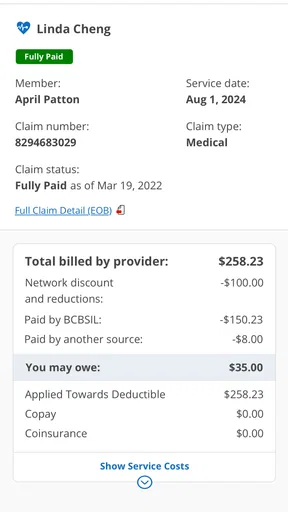
That distinction also helps set expectations around claims and benefits. Seeing information in an app can make it easier to keep track of plan-related activity, but a status or summary should not be confused with a promise that a charge is settled or that a service will be covered in every circumstance. If the financial consequence matters, I’d read the relevant plan information carefully and follow up through the official member support route before relying on an assumption.
Where it fits among health apps
Compared with a general health tracker, an insurer’s app has a narrower purpose. A tracker may be better for logging routines or looking at personal activity trends, while a provider’s app may be the more direct place to handle appointments and messages with a particular clinic. BCBSTX makes the most sense when the task begins with your BCBSTX membership. Keeping those roles separate can save time: use the insurer app for insurance-related needs, and use a clinic’s own system for details that belong to that clinic.
I would not install it expecting one screen to consolidate every doctor, record, prescription, and appointment from every organization I use. That is a common expectation for healthcare apps, but insurer tools and provider portals serve different purposes. If you have several kinds of care to coordinate, you may still need more than one app. The trade-off is that a focused member app can be easier to approach for coverage questions, while a broader personal health organizer may offer a more unified view of information from multiple sources.
Another practical point is account access. Before relying on any member app during travel or at a medical office, I’d check that I can sign in and locate the information I expect to use. A saved password, a working connection, and a charged phone matter just as much as the app itself in that moment. For a household that shares responsibility for arranging care, each person should understand which member account applies to the visit rather than assuming one person’s details cover everyone.
Who is likely to get the most from it
This app is most relevant to people who are BCBSTX members and want a convenient mobile route to their own plan information. It may be especially useful if you often need to check insurance details while away from home, prefer keeping fewer paper items in your wallet, or handle appointments and plan questions between other daily tasks. The free price and Everyone age rating make it accessible in ordinary terms, but the key question is still whether you have a BCBSTX membership that makes its tools useful to you.
I’d skip it if you are not a member, or if what you really need is a cross-insurer medical-record hub, a dedicated provider portal, or a general wellness tracker. Those are different jobs, and choosing the wrong app can add another login without solving the problem you have. If your needs are mostly about communicating with one doctor’s office, that office’s own app may be more direct; if you want to organize information from several sources, a broader health organizer may suit you better.
For anyone deciding whether to keep it installed, I’d judge it by a small test: can you find the member information you need without stress, and does that save you a step in a real healthcare errand? If yes, its focused role is a genuine advantage. If you rarely need mobile access to your insurance details, it may simply sit unused until a visit or plan question makes it worthwhile.
Have you ever found yourself tangled in the web of healthcare apps, trying to manage your insurance, medical records, and appointments all in one place? Well, let me tell you, I’ve been there, and that’s why I decided to give the BCBSTX app a whirl. Spoiler alert: it’s quite the lifesaver for those of us juggling healthcare on the go!
Getting Started with Ease
When I first downloaded the BCBSTX app, I was pleasantly surprised by its clean and intuitive interface. It’s like they knew exactly what I needed right from the get-go. Setting it up was a breeze—just a few taps and I was in. The app immediately made me feel like I had a personal healthcare assistant in my pocket.
One thing that stood out was the easy navigation. Whether you’re tech-savvy or a bit of a tech dinosaur, you’ll find your way around without a hitch. The main menu is straightforward, and everything is neatly categorized. No more scrolling endlessly or getting lost in a sea of options!
Your Health, Your Way
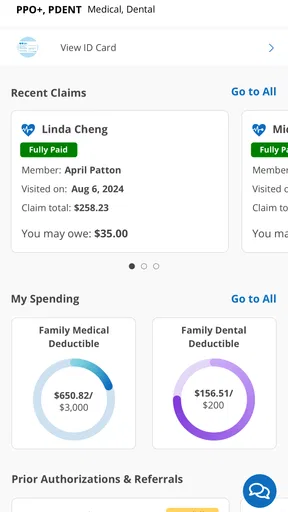
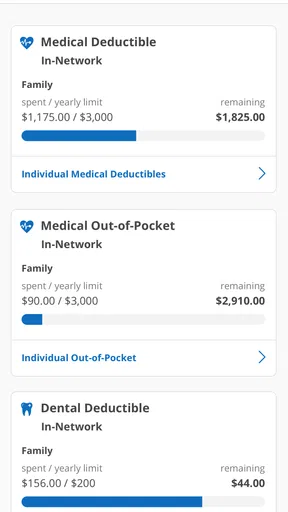
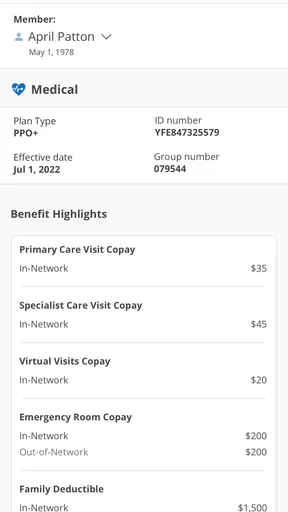
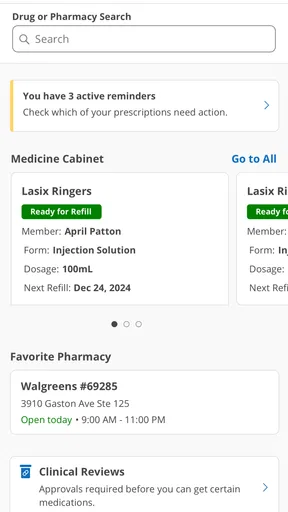
Now, let’s dive into the features. The app offers a comprehensive look at your health plan details, claims, and even lets you manage your prescriptions. I mean, how cool is that? You can literally keep track of your entire healthcare journey from the palm of your hand.
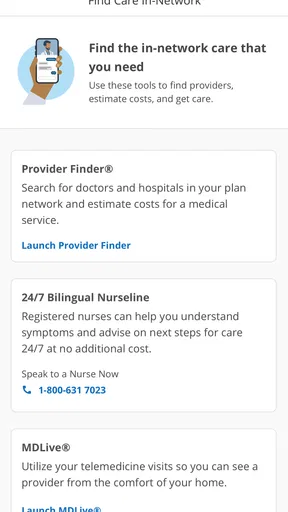
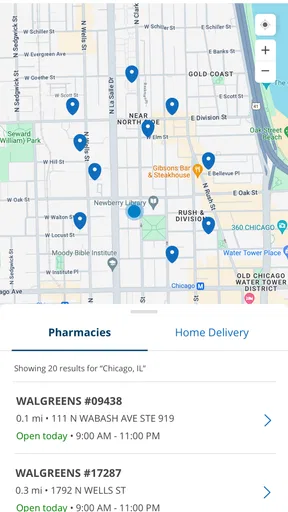
I particularly loved the feature that allows you to find doctors and hospitals nearby. It’s like having a personal GPS for healthcare services. Plus, the app provides reviews and ratings, so you can make informed decisions about where to go.
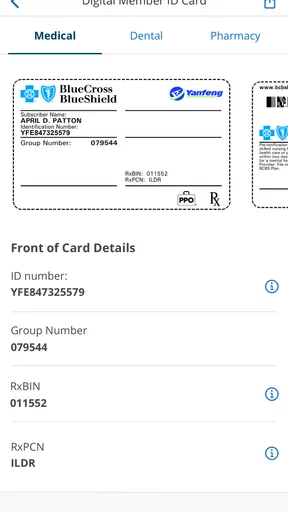
And if you’re like me, forever misplacing your insurance card, you’ll appreciate the digital ID card feature. No more fumbling through your wallet at the doctor’s office. Just a quick tap, and you’ve got all your info ready to go.
Staying Connected and Informed
One of the most important aspects of any healthcare app is communication, and BCBSTX does not disappoint. The app keeps you updated with notifications about your claims and benefits, ensuring you’re always in the loop.
What really impressed me was the integration with wellness programs. You can track your health goals, participate in challenges, and even earn rewards. It’s like having a little motivational coach cheering you on every step of the way.
And if you ever run into a snag, the app offers a direct line to customer service. I tried it out myself, and let me tell you, the support team is super responsive and friendly. They really know their stuff!
Final Thoughts
In conclusion, the BCBSTX app has become an essential tool in my healthcare arsenal. It’s user-friendly, packed with features, and genuinely makes managing my health a whole lot easier. Whether you’re constantly on the go or just want a simpler way to handle your healthcare needs, this app is definitely worth checking out.
So, if you’re ready to take control of your health with a trusty sidekick, give BCBSTX a download. I promise, you won’t be disappointed!
Pros
- User-friendly interface for easy navigation.
- Comprehensive coverage details and benefits.
- Real-time claim status updates.
- Access to virtual ID cards anytime.
- Secure messaging with customer support.
Cons
- Limited features for non-members.
- Occasional login issues reported.
- No offline access to information.
- Lacks integration with fitness apps.
- Notifications can be overwhelming.
FAQs for BCBSTX
What is the primary function of the BCBSTX app?
The BCBSTX app is designed to streamline healthcare management for Blue Cross and Blue Shield of Texas members. It allows users to access their insurance information, view policy details, check claim status, and find doctors or hospitals within the network. Additionally, users can manage their prescriptions and track their health and wellness activities.
Is the BCBSTX app available for both Android and iOS devices?
Yes, the BCBSTX app is available for download on both Android and iOS platforms. Users can find it on the Google Play Store for Android devices and the Apple App Store for iOS devices. The app is regularly updated to ensure compatibility and improved functionality across various devices.
How secure is my personal information on the BCBSTX app?
The BCBSTX app employs robust security measures to protect your personal and health information. It uses encryption to safeguard data transmissions and requires secure login credentials. Additionally, the app complies with industry standards and regulations to ensure that your privacy is maintained while using the app.
Can I make payments or manage my billing through the BCBSTX app?
Yes, the BCBSTX app offers features that allow users to manage their billing and make payments directly through the app. You can view your billing statements, set up payment methods, and schedule payments to ensure your health insurance coverage remains active without any hassle.
What should I do if I encounter issues while using the BCBSTX app?
If you experience any issues with the BCBSTX app, you can access the help section within the app for troubleshooting tips. Additionally, you can contact customer support through the app for personalized assistance. Regular updates also address common issues and improve overall app performance.


